
This document gives you an overview of managing teams and user permissions in Zaptic after release 122 (released on the 27th of February 2024).
Permissions
The table below details the user permissions available in Zaptic after release 122, available under an individual user in the Teams tab. The newly added permissions are highlighted in purple.
| Permission | Access/Functionality |
| Boards |
The boards tab in the portal, including all boards present within. |
| Data Management | Data management tab and the ability to create and update unit types and units. |
| Procedure Management | Procedures and Guides tabs and the ability to create a new procedure and the tasks and training within it as well as a view only permission to the rest of the procedures on the instance. |
| Procedure Admin | Like Procedure Management but with the addition of automatic collaboration on ALL procedures giving full edit access to all tasks and trainings in the instance. |
| User management | Teams tab and the ability to view existing users and teams. Note: Users with user management permission who are also team admins can add / remove users from the teams they admin. |
| Super User* | Admin privileges; gives access to all the above combined, as well as team administrator privileges to all teams. |
*The first Super User needs to be assigned by us, so please get in touch with support@zaptic.com. Other super users can assign subsequent super users.
Team management
Team pages now contain 2 tables. You can easily see who the team admin and team members are, and promote members to admins or remove users from this screen.
Team admins that are not also team members are automatically excluded from any tasks, training or schedules that the team they're in are assigned to, and won't appear in the training matrix.
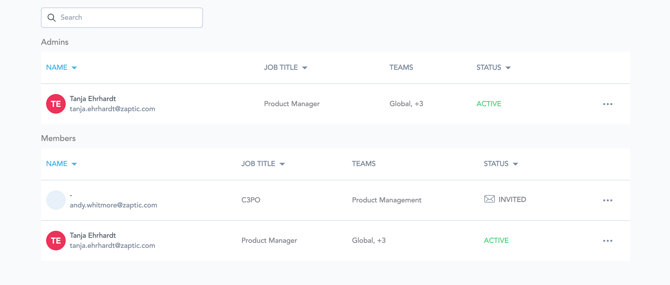
To promote someone to an admin, click on the ellipsis and select "Make Admin".