
Video released on 05/09/2023
The App is where frontline users complete assigned work, start ad hoc Tasks, search for Units, access Guides, review completed work, and manage their App settings.
Note: Intellect was previously known as Zaptic. Some older screenshots, exports, URLs, or internal references may still use the name “Zaptic”. In this article, Intellect refers to the current platform experience.
What is the Intellect / Zaptic App?
The Intellect App is the main workspace for frontline users.
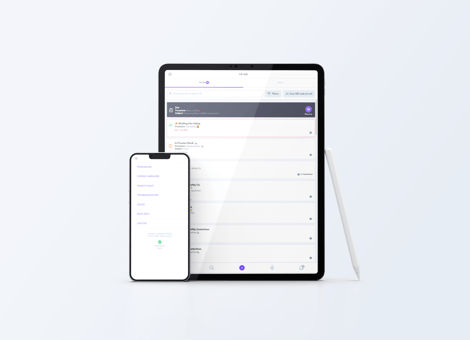
It allows users to complete operational work at the point of execution, rather than relying on paper forms, spreadsheets, or later manual updates.
Users may use the App to complete scheduled Tasks, start ad hoc Tasks, access supporting information, review previous activity, and submit Reports.
The exact App experience depends on the user’s access, assigned Teams, available Procedures, and the way the Super Users have configured the Portal.
To Do 
The To Do area shows work assigned to the signed-in user.
This may include scheduled Tasks, Training, or Actions that need to be completed, ordered by due date.
A scheduled Task appears in To Do when it has been assigned to the user or to a Team the user belongs to.
For example, an operator may see a start-of-shift check at the beginning of their shift. Once they open and complete the Task, Intellect creates a submitted Report.
The To Do area helps users focus on the work that is expected of them at that time.
Done
The Done area shows work completed by the signed-in user.
This may include completed Tasks, Training, and Actions.
From Done, users can reopen their submitted Reports and review information such as answers, status, comments, and Timeline activity.
For example, an operator wants to confirm the reading they submitted during the previous shift. They open Done, find the completed Task, and reopen the Report.
Done is primarily a record of the work completed from that user’s account. It does not automatically show all Reports submitted by other users.
Unit Search 
The Search area allows users to find Units and access information linked to them.
A Unit may represent a site, area, line, machine, asset, product, SKU, or another item configured in Data Management.
Users may search manually or scan a QR code or barcode, where scanning has been configured.
For example, an operator scans the QR code on Filler 1. The App opens the Filler 1 Unit page, where the user may be able to review recent activity, access linked Guides, start relevant Tasks, or contact an expert.
Search is especially useful when users need information linked to a specific machine, line, product, or area.
1. Unit pages
A Unit page gives users access to information and activity linked to a specific Unit.
Depending on the configuration, a Unit page may show the Unit Timeline, related Tasks, Guides, contact options, or other contextual information.
For example, a maintenance engineer opens the Unit page for a machine before starting work. They can review recent Reports on the Timeline and understand whether defects or Actions have already been raised.
Unit pages help connect work and information to the correct operational context.
2. Unit Timelines
A Unit Timeline shows recent activity linked to a Unit.
This may include submitted Reports, comments, status changes, Actions, and other updates.
For example, an operator opens the Timeline for a packaging line and sees that a defect was reported during the previous shift. They can open the Report to understand what happened and what follow-up has already been recorded.
Timelines are useful because they provide context before starting work and help teams understand what has happened over time.
3. Guides
Guides provide supporting information to users in the App.
They may include instructions, images, videos, troubleshooting information, SOPs, One Point Lessons, links, or other reference material.
Guides may be accessed from relevant areas of the App, such as a Unit page or during Task execution, depending on how they have been configured.
For example, a user completing a cleaning check may open a Guide that shows the expected clean condition. This helps them compare the current state against the standard before answering.
Guides help make knowledge available at the point of work.
4. Call an Expert
Where configured, users may be able to contact an expert from a Unit page.
Experts are linked to Units in Data Management.
The available contact methods depend on the expert’s User Profile details. This may include options such as email, phone, Microsoft Teams, WhatsApp, or another configured contact method.
For example, an operator opens the Unit page for Filler 1 and selects Call an Expert. If an engineering expert has been assigned to that Unit and their contact details are available in their profile, the operator can contact them for support.
This helps users reach the right person when specialist knowledge is needed.
Ad Hoc Tasks 
Not all work can be scheduled in advance.
Users can start ad hoc Tasks from the + menu when work needs to be completed at the time the need is identified.
This is useful for activities such as reporting a defect, raising a safety concern, recording an observation, starting a Gemba Walk, or completing an unscheduled check.
For example, an operator notices an abnormal condition on a machine. Instead of waiting for a scheduled Task, they open the + menu and start the relevant ad hoc Task, such as Report a Defect.
Once submitted, the ad hoc Task creates a Report in the same way as a scheduled Task.
Clusters on the ad hoc page
Ad hoc Tasks can be organised using Clusters.
Clusters group related ad hoc Tasks together, making it easier for users to find the right Task from the + menu.
This is useful when an instance contains many ad hoc Tasks across different use cases, departments, or work types.
Clusters help improve the App experience by making ad hoc work easier to navigate and reducing the risk of users selecting the wrong Task.
Actions 
The Actions area allows users to view and manage follow-up work assigned to them.
Actions are usually created when something requires further attention after a Task, Report, meeting, inspection, or review. They help make sure follow-up work has a clear owner and can be tracked through to completion.
For example, a Team Leader reviews a defect Report and creates an Action for Maintenance to inspect the affected machine. The assigned user can then see the Action in the App, review the context, complete the required work, and update the Action.
The Actions area helps users focus on follow-up work they are responsible for, rather than searching through Reports or comments to understand what needs to happen next.
Actions are covered in more detail in the dedicated Assigning an Action and the Actions Page article.
Notifications 
The Notifications area helps users stay aware of updates that may require their attention.
Notifications may relate to assigned work, Actions, comments, mentions, status changes, or other activity, depending on how Intellect has been configured.
For example, a user may receive a Notification when they are assigned a follow-up Action, tagged in a Report comment, or when activity they need to review has been updated.
Notifications help users respond to important updates without needing to manually search through Reports, Actions, or Timelines.
Notifications are covered in more detail in the dedicated Notifications in the App article.
Settings 
The Settings area allows users to manage their App experience and check useful account, device, and troubleshooting information.
Settings may include:
-
- User Profile
- Personalise
- Change Language
- Troubleshooting
- Device
- Build Info
- Log Out
Settings are covered in more detail in the App Settings article.