
What adding collaborators to a procedure allows -
- Collaborators get full visibility of the procedure
- Collaborators get full editing rights for the procedure, including the ability to:
- create and edit content
- manage procedure teams
- manage procedure collaborators
What you need in order to be able to add collaborators to a procedure:
- Access to the Zaptic Portal through my.zaptic.com
- Procedure Management permissions within the portal
- You need to be a collaborator on the procedure you wish to add the user too, or be able to raise this request with a current collaborator
How to add collaborators to a procedure
1. Enter the Zaptic portal through https://my.zaptic.com/
2. Select the procedures tab from the tabs across the top of the page:

3. Select the procedure you wish to add collaborators too, that you are already a collaborator on.
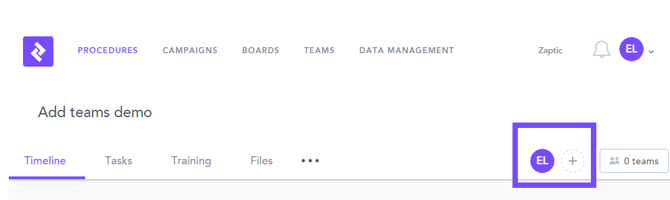
4. Press the plus symbol near the list of current collaborators:
5 Enter new collaborator emails, and finalise by selecting ''add collaborators'':