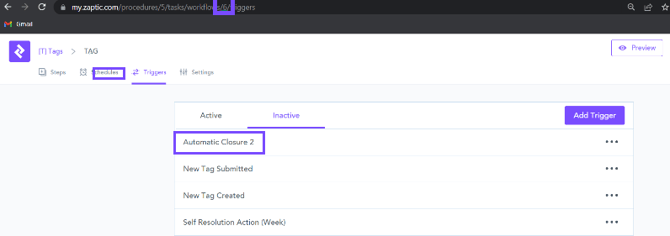
What you need in order to be able to configure a workflow so that reports automatically close when 'last actions' are completed -
- Access to the Zaptic Portal through my.zaptic.com
- Procedure Management permissions within the portal
- You need to be a collaborator on the procedure that contains the workflow you wish to configure
How to configure a workflow so that reports automatically close when 'last actions' are completed
1. Open the workflow you wish to configure and navigate to the 'triggers' tab -
2. Create the trigger that will enable the report to automatically close -
- Press 'add trigger'
- Give the trigger a name
- Select the option ''A new report is submitted''
- Select ''Set Status'' and choose the status from the dropdown (in this case, completed)
3. Set the trigger as active -
4. Send an email to support@zaptic.com so that they can finalise the trigger. This should include -
- Flow Name
- Flow ID (found in the URL web address when editing the workflow)
- Trigger Name
If you are configuring multiple triggers, you can raise these together on the same email to Zaptic Support by providing this information in excel format as outlined in the image below, A copy of this spreadsheet is also attached.