
Requirements
If you already use Power BI, and you’d like to connect to your Zaptic BI boards from your own instance, you can do so using an on-premises data gateway.
On-premises data gateway installation
Because the gateway runs on the machine that you install it on, be sure to install it on a computer (or server) that's always turned on.
Follow these steps to install:
- Download the gateway
- In the gateway installer, keep the default installation path, accept the terms of use, and then select Install.
- Enter the email address for your Office 365 organization account, and then select Sign in.
- Select Register a new gateway on this computer > Next.
- Enter a name for the gateway. The name must be unique across the tenant. Also enter a recovery key. You'll need this key if you ever want to recover or move your gateway. Select Configure.
- Review the information in the final window. Select Close.
Add or remove a gateway data source
- From the page header in the Power BI service, select Settings
> Manage connections and gateways.
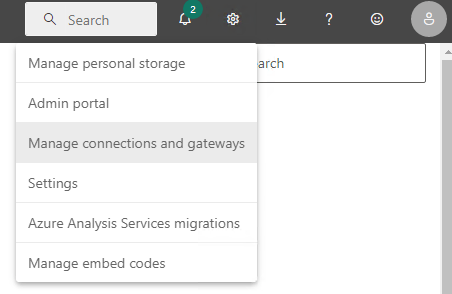
- Select New at the top of the ribbon to add a new data source.
- Choose the gateway you want to create the connection on, by providing the Gateway cluster name. Here you need to choose the gateway name you entered in step 5. during On-premises data gateway installation. Select the PostgreSQL Data Source Type.
3a. Server: Zaptic BI Database endpoint
3b. Authentication: Basic
3c. Username and password: Use the information provided to you by the Zaptic BI team
3d. Connection: Not encrypted
3e. Privacy level: Organizational
By following the steps above you should be able to use the gateway as your data source.
Adding credentials to the dashboard
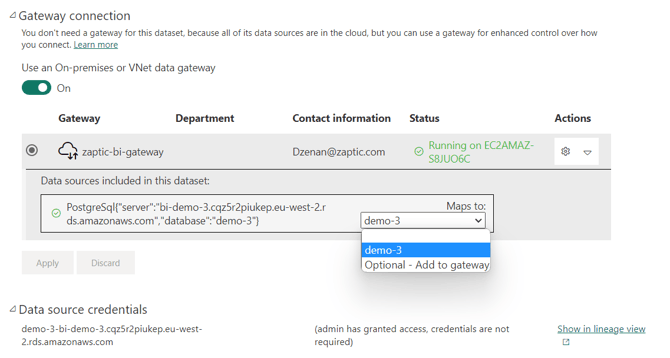
Once you have created the gateway data source, you then need to use the gateway as the credentials in your dashboard.
This can be achieved by opening the settings of your dataset for this dashboard and setting it up to map the ‘Gateway connection’ for the relevant server you are using (as below) and applying this which will then display the ‘Data source settings’ as per below also.
FAQ / Additional resources
For help and assistance feel free to contact the Zaptic support team via support@zaptic.com.
Additional documentation about the data gateway can be found here:
https://learn.microsoft.com/en-us/data-integration/gateway/service-gateway-install
https://learn.microsoft.com/en-us/power-bi/connect-data/service-gateway-data-sources
https://learn.microsoft.com/en-us/data-integration/gateway/service-gateway-app
https://learn.microsoft.com/en-us/power-bi/connect-data/service-gateway-data-sources