
Video released on 21/06/2024
What is the Procedure Timeline?
Every Procedure in Intellect has a Timeline attached to it. Think of it as an activity feed for that Procedure: it shows you what's happened recently, so you and your team can stay on the same page even if you're working on different shifts. If you're new to Intellect, this is usually the fastest way to catch up on a Procedure before you start work on it.
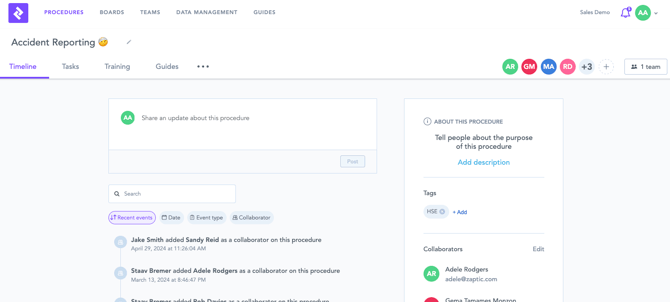
What you'll see on the Timeline
The Timeline lists recent events for the Procedure, including Reports that have been submitted and any comments or updates left by Team members. Instead of opening each Report one by one, you can scroll the Timeline to get a quick history of activity.
For example, if several reports have been completed on a line that day, you'll see each one logged in order.
You can also filter the Timeline to show only recent updates, particular tasks, or looking for updates made by a particular user. This is helpful if you haven't touched a Procedure in a while, say after a vacation, and want to catch up without scrolling through everything.
Tagging a Team member
If you need to bring someone into the conversation, type @ followed by their name in a Report comment. This tags them directly, and the comment shows up in the Timeline so there's a record of it. For example, if you spot something unusual during a check, you can tag your supervisor to flag it right away.
Procedure details
Above the activity feed, the Timeline also shows some background information about the Procedure itself: its name, a description, and any Tags that have been assigned to it. It also tells you who has access to the Procedure, either a Team (in the App) or a Collaborator (in the Portal).
If you're unfamiliar with how Team and Collaborator access works, that's explained in the Teams and User Access article.