
Release 133 (released on 19th August 2024) introduces the ability to exert greater control over report status changes. It lets you set who can change which status and how statuses can transition.
What this means for you
Whether you already use report statuses, this functionality is great for:
- defining who can change a status - this can be customised for each status - great for multi-level approvals where each level has a different approver
- define status transitions, i.e. that a "Pending Review" status can only be changed to "Approved" and "Rejected", or that a "Rejected" status cannot be changed to "Approved"
- approving Kaizens, improvement ideas or guides created from the shop floor
- define who can mark defects as complete
- sign off on training modules
How it works
If you have never used multiple report statuses before
Step 1: Add your statuses
Head to the "Statuses" tab for your task or training

Your default status will be displayed:
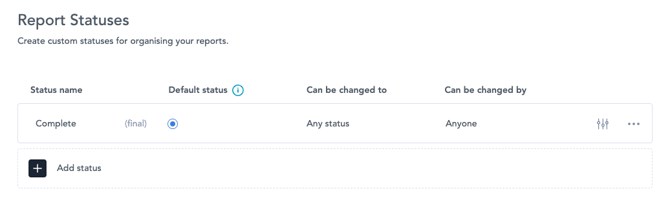
By default, every report has a "Completed" state. You can add new statuses by clicking "Add status", and giving your status a name. (If you don't give it one, we will auto-populate a default name)
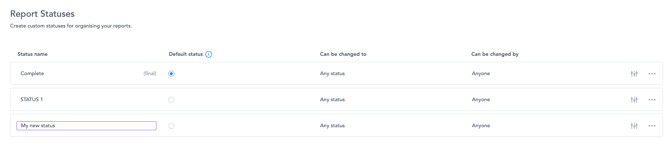
You can now customise your status:
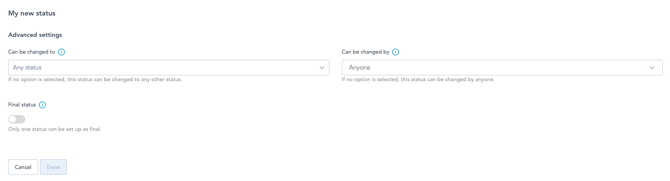
Default status: This is the status the report will receive when it is submitted.
Can be changed to: Defines what the current status can be transitioned to.
Can be changed by: Nominate individuals or teams who can change the status
Final status: If your status is considered a final status, i.e. when a task or training is completed, set this toggle on. This will tell the training matrix when to set the status of the training to "complete".
If you have used multiple report statuses before
Follow the steps above to customise your statuses as desired.
Note: You will need to ensure that your training modules have the correct final state set. By default, after release 133, the default status is also the final status - you will need to change this to match your desired approval flow.
FAQ
What happens if I use triggers to set report statuses?
Triggers override the status settings, therefore, they will be able to perform transitions otherwise not allowed by status settings.
We use integrations that automatically set statuses in Zaptic. Will these be affected?
No, these will continue to work as normal.
How are final statuses accounted for and where?
Currently, final statuses are important for the training matrix to mark the training as complete. They can also be set for tasks, and this information can be accounted for to understand what is awaiting approval. We are currently looking into incorporating this information into boards