Statuses
-
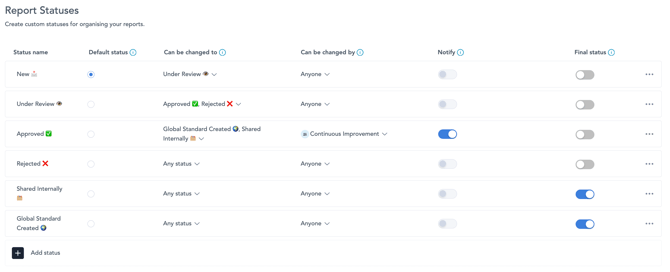
- The Statuses tab, allow you to create custom statuses to allow you to organise and control your report submission statuses.
-
Status Name: The name of the status that can be applied to a completed report.
-
-
Default Status: The status that will be automatically applied when a report is completed.
-
-
-
Can Be Changed To: Defines which statuses this status can be changed to. This controls the available status flow and prevents users from moving reports into invalid statuses.
-
-
-
Can Be Changed By: Defines which users or teams are allowed to change the report to this status. This can be restricted to specific individuals or teams, or left open if anyone is allowed to make the change.
-
-
-
Notify: Defines who should be notified when the report is changed to this status. Notifications are sent to the users or teams permitted to make the status change.
-
-
-
Final Status: Indicates whether this status is the final step in the status flow. Once a report reaches a final status, no further status changes are expected. This final status is used to determine the date & time when a report is "complete."
-
Settings
-
-
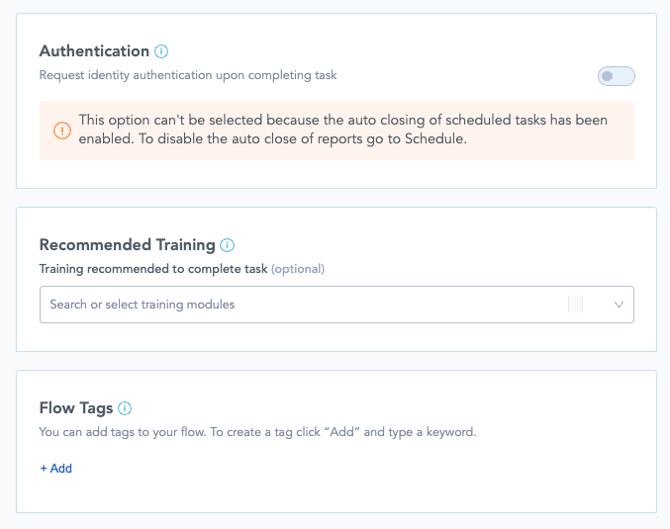
Authentication: Requires the user to re-authenticate when completing the task. This adds an additional compliance or sign-off step and is typically used for higher-control processes such as quality checks. This option may not be available if scheduled tasks are set to auto-close.
-
Recommended Training: Allows you to assign training modules that are recommended for completing the task. This is optional and can be used to guide users toward relevant training materials before or during task completion.
-
Flow Tags: Allows you to add tags to the flow. These tags can be used for reporting, board logic, filtering, or integrations.
-
Report Content: Controls whether text elements are displayed in submitted reports. If enabled, text content from the task will appear in the report. If disabled, only the user’s selected answers or submitted responses will appear.
-