
Search page:
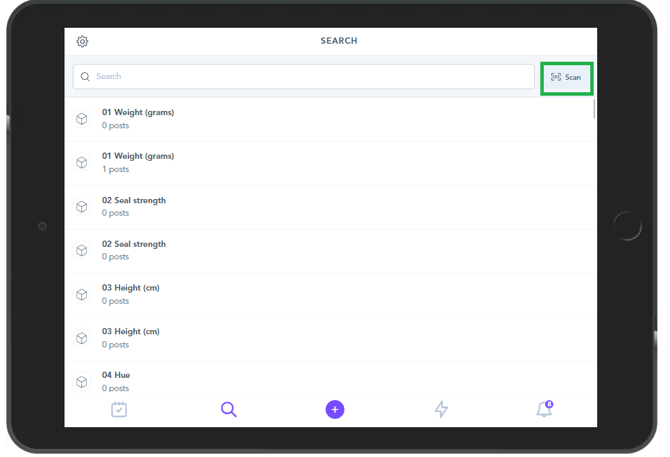
Within the Search page you will see the option to "Scan" a code:
- If you scan a QR code in the Search page it will open up your device's Camera.
- Use the camera to take a photograph of a QR code or a Barcode.
- When these QR or Barcodes are linked to Zaptic, this will display the Unit content page with all the guides, tasks and information about the relevant unit.
Additional flow paths which can be used inside of the Search page:
For each of the following paths, you will want to create a Text-type QR Code with the following path. In each scenario, you will be replacing the inputs marked in red with the proper information found from the instance.
Path to open a specific Guide:
zaptic-path:/guide/execute/Guide-ID
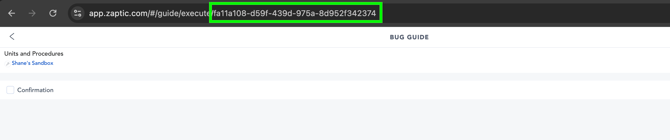
The specific Guide ID can be found at the end of the webpage's URL when opening the Guide on the Portal or App via a web browser.
e.g https://app.zaptic.com/#/guide/execute/fa11a108-d59f-439d-975a-8d952f342374
Path to start a specific ad-hoc workflow:
zaptic-path:/todo/adhoc/procedure-ID/workflow-ID
The specific Procedure ID and Workflow ID can be found at the end of the webpage's URL when opening the workflow on the Portal via a web browser. The first number found will be the Procedure ID, and the second number will be the Workflow ID.
e.g https://zaptic-server.zaptic.com/procedures/36/tasks/workflows/60/edit
