
Understanding Parameters
A parameter lets you set a discrete unit into a schedule. As well as hardcoding which unit subject a flow schedule applies to, you can also define a parameter that represents [unit], and the actual value gets specified per schedule. This can either be automatic via an integration or manual via user selection.
When the schedule runs, the content loop reads the parameter tied to it's specific occurance execution and filters accordingly — so the same flow can serve unit A and parameter A on one schedule and unit A and parameter B on another, with no duplicate logic.
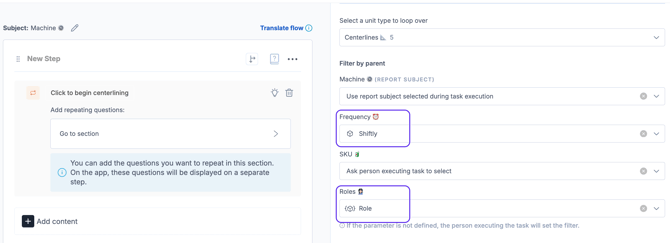
In practice, this means a single task can support many schedules, each pointed at a different unit subject and parameter subject rather than maintaining near-identical copies of the same flow for every unit you need to cover. This is particularly relevant for tasks which adapt based on 3 or more variables. For example, a check that depends on Machine, SKU, Frequency and Person/Role.
In the example below, both Frequency and Roles are parameters:
Configuring Parameters
Parameters are set up on the Settings page of the flow. This is where you define the parameter itself (the unit it represents) before it becomes available to reference within the content loop and to assign within any schedule.
.gif?width=670&height=366&name=ezgif.com-video-to-gif-converter%20(2).gif)
Adding a Parameter into the Content Loop
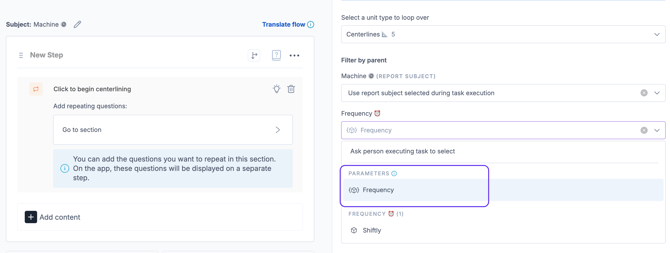
- One your parameter is created, you can use it within the content loop.
- The unit type of the parameter must have a parent relation to the looped unit
- Select the parameter option from your parent filter drop downs
Note: if the parameter is not then specified in the schedule, the backup is that it is then user selected
For more information on using parameters and the content loop, read the Content Loop article.
Adding a Parameter into a Schedule
- Once your parameter has been selected in the content loop settings, you can add it to the schedule
- The example below would create 2 schedules filtered to the operator role checks that happen on a shiftly basis for each the Labeller & Filler machines.
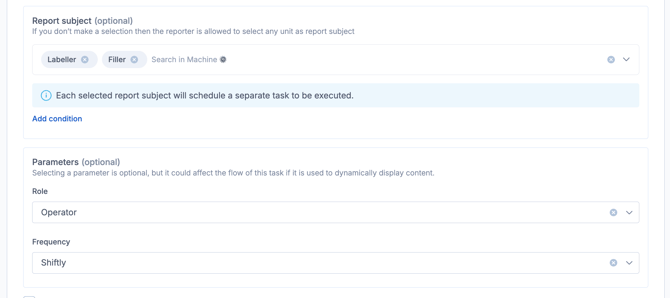
Parameters enable a single task to run multiple schedule types which, alongside the content loop, can hugely reduce the need to manage multiple flows.